From a Local Knowledge Brain to Architecture artifact
In my last two posts I built a local knowledge environment for my work as an Enterprise Architect.
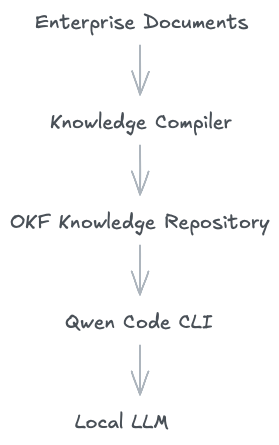
Part 1 was about turning a huge amounts of enterprise documents — PDFs, PowerPoints, Word files, contracts, architecture specs into a structured knowledge repository using Google's Open Knowledge Format and Qwen Code CLI. The pipeline was straightforward:
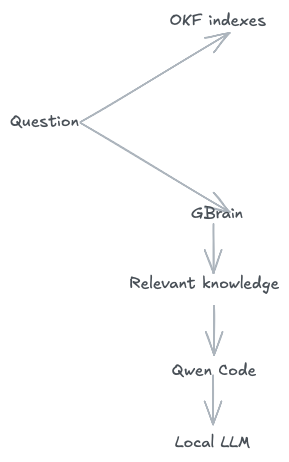
Part 2 added GBrain to solve a different problem. Sometimes I know exactly where information lives. Sometimes I only know what I'm looking for. GBrain gave me semantic search over the same OKF repository without replacing it:
After using this setup for a while, a new question emerged. What if Qwen Code could use this knowledge not just to answer questions or analysis documents, but to help me develop an architecture artifact like diagram or ADR (Architecture decision record)?
That became the Part 3 of this serious.
The problem Is not drawing the diagram
Architects draw diagrams constantly. But let's be honest — drawing boxes and arrows is not the hard part.
The hard part is deciding what belongs in the diagram. When I'm creating an architecture for a new system, I need to think about business requirements, functional requirements, non-functional requirements, corporate architecture standards, technology standards, security requirements, regulations, existing systems, previous architecture decisions, ADRs, previous Platform Board decisions, and architecture documents from other projects. All of this information already exists somewhere in the organization. The problem is that it is scattered across hundreds or thousands of documents and local systems like wiki, confluence, registers.
So the real workflow looks like this:
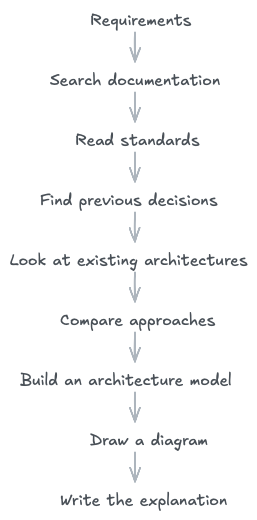
The diagram is the final step. Everything before it is the actual work.
I didn't want another AI Architecture tool
This was my deliberate choice. I could have built a tool that takes a text prompt and spits out an architecture diagram. Something like:
"Create an architecture for an order management system"
                    ↓
                   AI
                    ↓
             Architecture diagram
But that would be useless. The model doesn't know my company's architecture standards. It doesn't know which platforms are approved. It doesn't know our existing systems. It doesn't know why a particular decision was made five years ago. And it absolutely should not invent those things. Instead, I wanted to use the knowledge I had already built. The idea was:
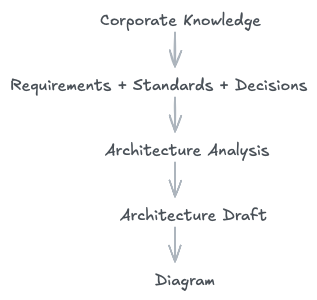
The diagram is not the starting point. Actually, it is the output of working with the knowledge base.
Enter Archify
For the actual diagram generation, I started experimenting with Archify. Archify provides an agent-oriented way to create architecture and other technical diagrams, validate the diagram structure, and render the result as a visual artifact. It supports architecture, workflow, sequence, data-flow, and lifecycle diagrams.
For my use case, this was a good fit (not the best one, I like Visio ;-)). I didn't need another architecture repository. I needed a way for Qwen Code to turn an architecture model into a useful visual representation.
My pipeline now looks like this:
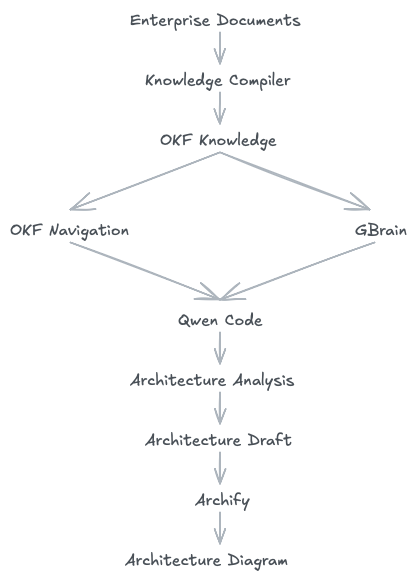
This is where the three parts of the project finally connect into one flow.
Disclaimer: Archify is not necessarily the best choice. It worked well in this experiment, but the diagrams it generates are primarily meant to be edited by the AI agent, not manually. If you prefer diagrams that you can edit yourself, you can use Draw.io or Excalidraw instead. The same approach still works: Qwen Code uses the OKF knowledge base and GBrain to build the architecture model, and then the result can be rendered or exported to your preferred diagramming tool. The renderer is replaceable; the architecture model and the corporate knowledge behind it are what matter.Architecture comes before visualization
I didn't want Qwen Code CLI to immediately start drawing boxes. So I created a dedicated Qwen Code skill for enterprise architecture diagrams. The skill is built on a simple principle: first understand the architecture, then visualize it.
Before creating any diagram, Qwen Code is instructed to identify:
the purpose of the architecture;
business and functional requirements;
architectural drivers;
constraints;
existing systems;
relevant standards;
existing architecture decisions and ADRs;
important dependencies;
missing information;
open questions.
Only after that, it build the architecture model and create the diagram. This small change makes a large difference.
Not everything the Model finds is a fact
This turned out to be one of the most important rules in the skill. When working with enterprise architecture, there is a common pitfall to treat every generated statement as fact. I don't want that. The skill separates architectural information into four categories:
FACT — Something explicitly stated in the source documents.
DERIVED — Something that logically follows from the requirements or documented architecture.
PROPOSAL — Something suggested as a possible architectural solution.
UNKNOWN — Something necessary to make a decision but not available in the knowledge base.
For example, suppose a requirement says: "The system must continue operating when one instance fails."
From this, the architecture may derive a requirement for redundancy. But that does not mean the correct response is: "Deploy three Kubernetes pods behind an NGINX load balancer." That would be an architectural proposal. The distinction matters. A good architecture assistant should not quietly turn assumptions into facts.
Corporate knowledge has different levels of authority
The skill also needs to understand that not all documents carry the same weight. If I find contradictory information, the skill uses a source hierarchy:
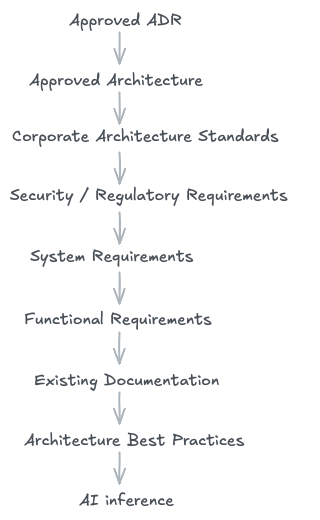
This doesn't mean lower-level documents are unimportant. It means the assistant should know where a statement came from. If two authoritative documents contradict each other, the assistant should not silently pick one. It should tell me and ask my decision:
"These two sources contain conflicting requirements. An architectural decision is required."
That is far more useful to an architect than a confident-looking diagram built on a hidden contradiction.
From Requirements to Architecture
I also wanted the skill to avoid directly converting requirements into boxes.
Consider: "The system must support high transaction throughput."
That is not a component. It is an architectural driver. The reasoning should look like this:
Requirement
     ↓
Architectural Driver
     ↓
Architectural Implication
     ↓
Possible Design
For example
High throughput
       ↓
Scalability
       ↓
Independent scaling may be required
       ↓
Possible service decomposition
The final architecture can then consider different options. This keeps the reasoning separate from the drawing.
The architecture model in the middle
This led me to introduce one more conceptual layer.
Instead of:
Documents → DiagramI use:
Documents
    ↓
Evidence
    ↓
Architecture Model
    ↓
Diagram
The architecture model or design contains things like:
Architecture objective
Architecture drivers
Constraints
Components
Relationships
Architecture decisions
Assumptions
Open questions
This intermediate layer is important because it separates architecture reasoning from visualization. Archify then becomes the rendering and validation part of the process, not the place where architectural decisions are made. Here is the link of Skill.
My first experiment
For my first test, I used my existing OKF knowledge base, which already contains the material I work with daily: architecture documents, requirements, standards, Platform Board materials, contracts, previous architecture work, and technical documentation.
I asked Qwen Code to use this knowledge and create an architecture diagram. The first attempt was better than I expected. It pulled information from the existing knowledge repository, identified relevant architectural elements, and produced a draft diagram.
But the more important result was this: the output was based on my knowledge base, not a generic architecture generated from a short prompt. That difference is exactly what I was looking for.
What has actually changed?
At this point, my workflow looks different.
Previously:
Requirements
     ↓
Architect searches documentation
     ↓
Architect reads documents
     ↓
Architect compares information
     ↓
Architect builds architecture
     ↓
Architect draws diagram
Now:
Requirements
     ↓
Qwen searches local knowledge
     ↓
Relevant evidence
     ↓
Architecture analysis
     ↓
Architecture draft
     ↓
Architect reviews
     ↓
Archify
     ↓
Architecture diagram
Note that, the architect is still responsible for the architecture. The difference is that some of the work required to find and organize the context can now be delegated.
This Is not an AI tool for architects
I want to be clear about what this is and what it isn't. I am not trying to build an "AI architect." And I am not building another generic architecture diagram generator.
The interesting part is somewhere else entirely. I already have a large amount of corporate knowledge. The OKF pipeline made that knowledge structured and accessible. GBrain made it easier to find when I don't know where it lives. Qwen Code can reason over the retrieved information. Archify can turn the resulting architecture model into a visual representation.
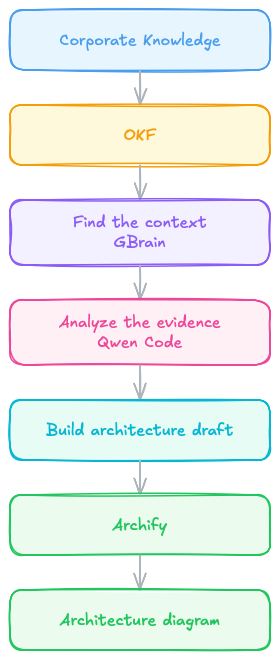
The tools are not the product. The knowledge is the foundation.
There is an important boundary here. I don't want the system to make the final architecture decision. A generated architecture is a draft. The architect still needs to:
validate the requirements;
challenge assumptions;
check standards;
evaluate trade-offs;
review risks;
discuss alternatives;
make the final architectural decision.
The goal is not to remove this work. The goal is to spend less time finding and organizing information before doing it. That is a much more realistic role for AI in architecture.
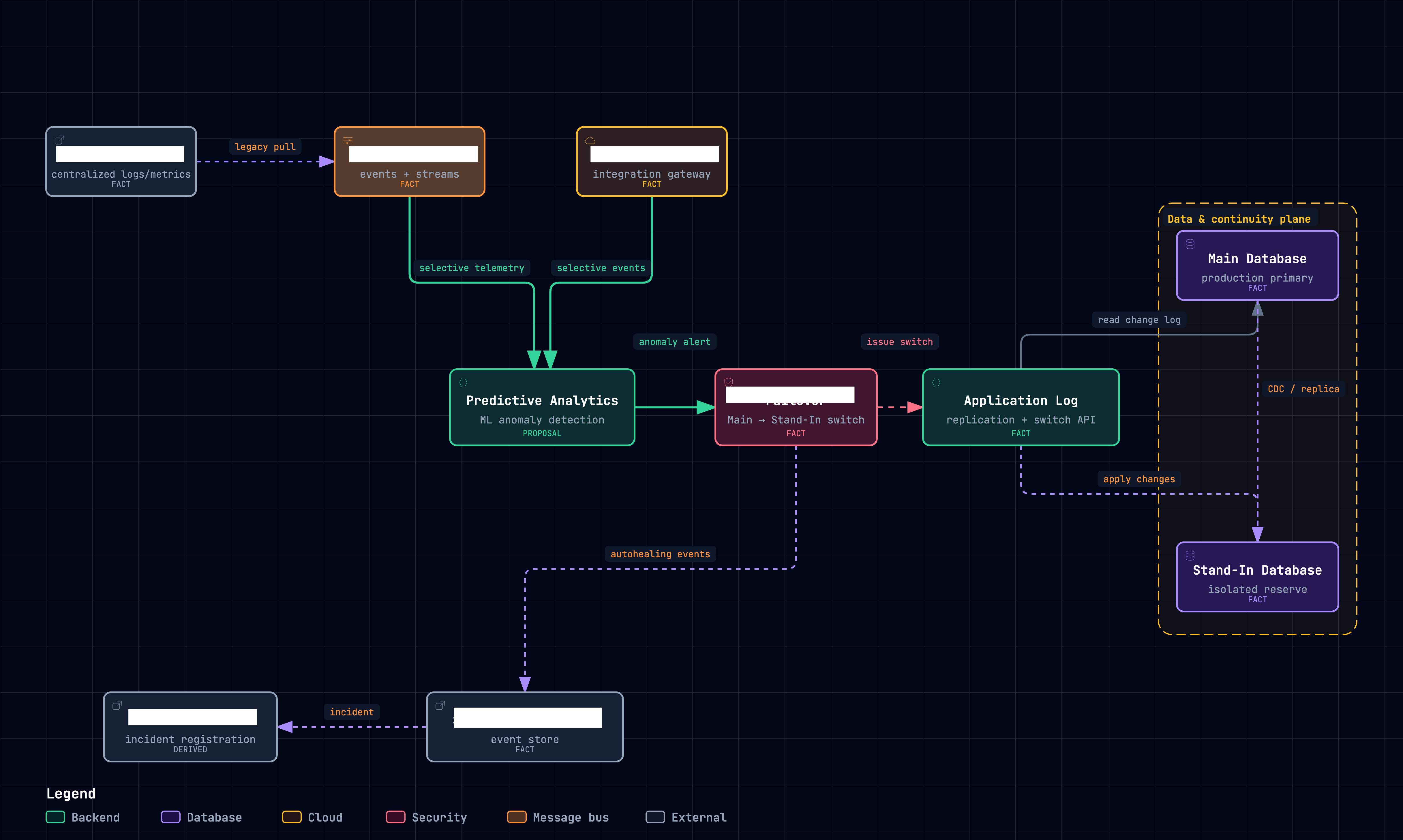
Here is an exported image of the diagram.
Final thought
I started this project because I had too many documents. Then I realized that documents weren't really the problem. The problem was that valuable architectural knowledge was trapped inside them.
OKF gave me a structured way to organize it. GBrain gave me another way to find it. Qwen Code gave me a way to work with it. Archify gave me a way to visualize the resulting architecture.
But none of these is the main idea. The main idea is this: don't build an AI tool that knows architecture. Build a system that allows AI to use the architecture knowledge your organization already has. That is a much more interesting direction for a corporate architect.
And I think the next step is not another chatbot. It is turning the knowledge base into something that can actually participate in the architecture process.