From an AI Knowledge base to a Local Knowledge Brain
In my last post I walked through how I built an AI Knowledge base compiler. The setup was: take a huge amounts of enterprise documents — PDFs, PowerPoints, Word files, contracts, architecture specs — run them through a pipeline, and end up with a clean OKF knowledge repository that Qwen Code CLI could navigate.
The idea was very simple. Instead of dumping hundreds of documents on an LLM and hoping for the best, I wanted to organize the knowledge once and let the AI find its way around.
And surprisingly? It worked. It became part of my daily workflow. But after living with it for a while, I hit the next wall.
A structured repository is perfect when you roughly know where something lives.
"Find the Platform Board presentation from 2019." - No problem.
"Using knowledge/index.md, find the section about logical replication using CDC." - Easy.
But when I started asking questions like:
Where did we ever talk about LLM-d installation?
Which documents have similar reliability requirements?
How did our thinking about high availability evolve across different architecture projects?
These are different. I know what I'm looking for. I just don't know where it is.
That's why I started playing around with GBrain.
Why GBrain?
First, let me clear about something: I didn't want to replace my OKF repository.
The last thing I needed was another black box where documents go into a vector database and become impossible to inspect. One of the things I like most about my current setup is that the knowledge is still there. You can open it. You can read it. You can version-control it. You don't need a special platform to understand it.
knowledge/
    Platform Board/
    Architecture/
       replication.md
       monitoring.md
       backup.md
This lines up perfectly with what OKF is about: knowledge in a format that works for both humans and agents, built from Markdown and YAML frontmatter, with no central system or proprietary format locking you in.
So I started thinking of the two systems as doing different jobs: OKF stores the knowledge. GBrain helps you find it out.
That distinction ended up being the foundation for everything else. OKF is where the knowledge lives. My repository has the original document structure, metadata, titles, descriptions, tags, sections, links back to source files, and human-readable Markdown. I can open it without GBrain. I can use it without a vector database. Qwen Code can navigate it directly.
GBrain sits on top and adds a retrieval layer. It indexes the Markdown repository and gives you search and hybrid retrieval over the content. That creates a second way into the same knowledge.
Instead of only asking "where is this document?" you can ask "which parts of my knowledge base are related to this question?" That difference matters.
The Architecture
After wiring everything together, this is what I ended up with:
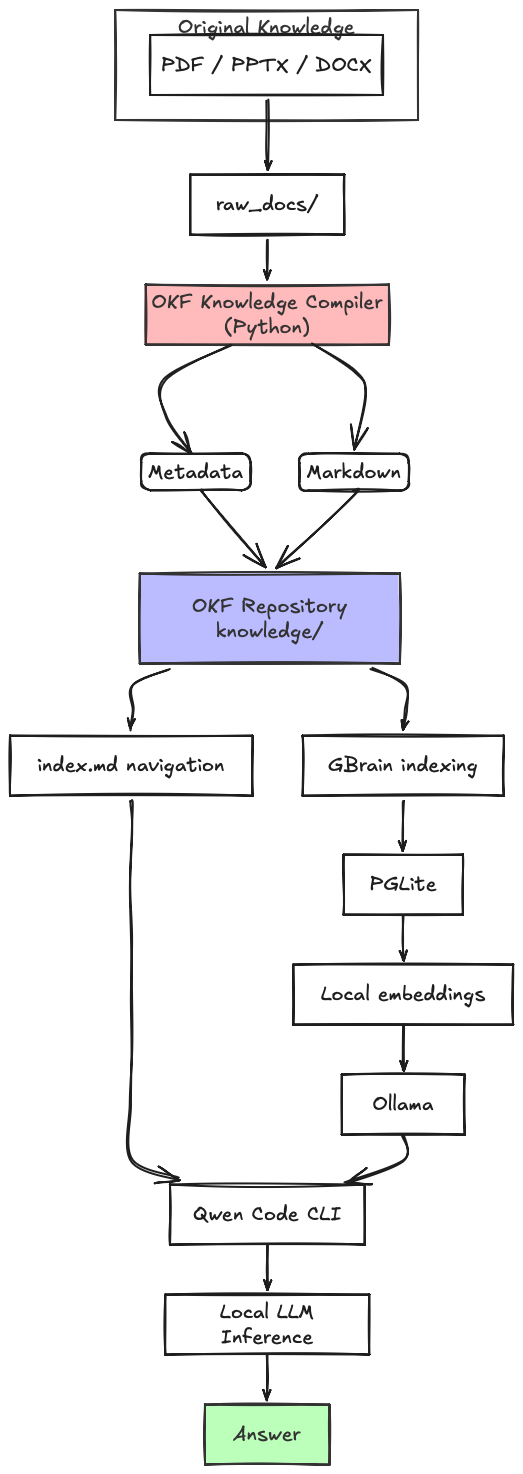
The key thing here is that there are now two ways to get at the information.
Path 1: Structured Navigation
When I know more or less where the information is, QwenCode CLI uses the OKF indexes.
Question → index.md → Directory → Relevant document → Relevant sectionFor example: "Using @knowledge/index.md as a catalog map, find the presentation section discussing logical replication using CDC."
This is deterministic. It's transparent. It doesn't need semantic search. And for documents you already know about, it's extremely effective.
Path 2: Semantic Knowledge Retrieval
When I have no idea where the informations lives, GBrain searches the indexed knowledge.
Question → GBrain → Relevant documents → Relevant sections → Qwen Code → AnalysisFor example: "Find documents related to LLM-d installation." Or: "Find architecture documents discussing reliability and high availability." Or: "Search across my knowledge base for similar discussions about multi-data-center deployment."
This is where the second layer got tricky.
                 USER QUESTION
                        │
          ┌─────────────┴─────────────┐
          │                           │
    Known location              Unknown location
          │                           │
          ▼                           ▼
      OKF Index                   GBrain
          │                           │
          └─────────────┬─────────────┘
                        ▼
                   Qwen Code
                        │
                        ▼
                   Local LLM
                        │
                        ▼
                     Answer
For my day-to-day work, this is way more useful than forcing every single question through one retrieval mechanism.
My Local Setup
This section assumes you already have the pipeline from the previous blog post. My workspace looks roughly like this:
workspace/
│
├── raw_docs/
│   ├── Platform Board/
│   ├── Architecture/
│   ├── Standards/
│   └── Contracts/
│
├── knowledge/
│   ├── architecture/
│   ├── contracts/
│   ├── standards/
│   └── index.md
│
├── okf_converter.py
│
└── generate_indexes.py
raw_docs/ is still the source of truth, where knowledge/ holds the compiled repository.
Step 1: Install Ollama
I wanted the whole retrieval pipeline to stay local. For embeddings, I'm using Ollama with nomic-embed-text.
First, make sure Ollama is installed and running. Then pull the embedding model:
ollama pull nomic-embed-textVerify it's there:
ollama listThe embedding model is separate from the LLM model that Qwen Code uses for reasoning. That separation is important.
LLM model → Reasoning
nomic-embed-text → Embeddings for retrieval
Step 2: Install GBrain
GBrain needs Bun, so install that first. Once Bun is ready:
bun install -g github:garrytan/gbrainCheck the installation:
gbrain --versionThe GBrain docs specifically recommend installing from GitHub because there's another package with the same name that isn't the same project.
Step 3: Create a Local Brain
I'm using PGLite for my local environment. This gives you a local database without needing Docker or a separate PostgreSQL server. For a fresh setup with Ollama embeddings, initialize GBrain explicitly with the model and its dimensions:
gbrain init --pglite \
  --embedding-model ollama:nomic-embed-text \
  --embedding-dimensions 768
The explicit embedding configuration matters because the dimensions are tied to the storage schema. The GBrain docs warn against casually changing the embedding model after initialization without going through the proper migration or reinitialization path.
After initialization, run:
gbrain doctorI strongly recommend running doctor before you import a large knowledge repository. It'll save you headaches later.
Step 4: Test the Embedding Provider
Before you index thousands of documents, test the embedding provider directly:
gbrain providers test --model ollama:nomic-embed-text:latest
In my environment, this finished quickly and returned a 768-dimensional embedding. That was a good sign, but I later learned something important: a successful provider test doesn't mean the full search path will be equally fast. More on that in a bit.
Step 5: Import the OKF Knowledge Repository
Now you can import your compiled knowledge:
gbrain import /path/to/workspace/knowledgeGBrain imports the Markdown content and builds its own retrieval representation. The original OKF repository stays exactly as it was.
knowledge/
     │
     │ remains readable
     │ remains editable
     │ remains version controlled
     ▼
GBrain
     │
     ▼
Search index
     │
     ▼
Retrieval
The files are still yours. GBrain is just another layer on top of the OKF repository.
Step 6: Check the Imported Knowledge
After import, check the state of things:
gbrain stats
gbrain doctor
At this point, I recommend testing GBrain directly from the command line before you even think about connecting it to Qwen Code.
Try:
gbrain search "LLM-d installation"
And then:
gbrain query "How is LLM-d installed?"
This matters because it separates two different problems:
Problem A: Does GBrain work?
Problem B: Does Qwen Code work correctly with GBrain through MCP?
Do not debug both at the same time. Trust me on this.
Step 7: Connect GBrain to Qwen Code
Qwen Code supports MCP servers, which lets it call external tools during an agent session. Local stdio servers can be configured in Qwen Code settings or through the qwen mcp add command.
The basic flow is as follows:
Qwen Code → MCP → gbrain serve → Local GBrain databaseA simple MCP registration looks like as shown below:
qwen mcp add --scope user \
  gbrain \
  gbrain serve --surface full
Verify it:
qwen mcp listAnd then start Qwen Code CLI with the following command:
qwenAn Important Decision: verbs or full?
This was one of the more interesting things I stumbled on while experimenting. GBrain offers different MCP surfaces. The verbs surface exposes a smaller, memory-oriented protocol built around operations like recall. The full surface exposes a much broader set of GBrain operations. The docs describe recall as supporting saved facts and query-based retrieval over indexed pages, while synthesize is explicitly marked as a potentially expensive LLM-backed operation.
I started with:
gbrain serve --surface verbsAnd told Qwen Code to use recall for document retrieval. It was a useful experiment, but it taught me something. For a large document knowledge base, you need to think carefully about which GBrain operation you actually want the agent to use.
My use case isn't "what facts has the system remembered about me?" My use case is "find the relevant documents and sections in my knowledge repository." Those are not the same problem.
For a document-oriented workflow, I want Qwen to follow an explicit retrieval sequence:
search → find candidate documents → query → semantic or hybrid retrieval → get_page → read the original content → Qwen analyzes itQwen Code also lets you filter which tools are exposed to the model. This is handy when an MCP server exposes a lot of operations and you want the agent to focus on a smaller retrieval toolkit.
Step 8: Test the Complete Pipeline
Now the full query path looks like this:
User → Qwen Code → GBrain MCP → Search knowledge → Return relevant sections → Qwen reads the evidence → AnswerA good test prompt:
Search my local knowledge base for information about "llm-d installation". Return the most relevant source documents and sections first. Use the retrieved content as evidence. Do not analyze the entire knowledge base unless the initial results are insufficient.I like prompts like this because they describe the goal without forcing the agent to use a specific internal operation. Let the agent retrieve the evidence first. Then it can reason over it.
What I learned about performance
This section wasn't in my original plan. I expected the integration to just work. It didn't. And honestly, this is probably the most useful part of the entire experiment.
My First Symptom
I asked Qwen Code to search my local knowledge base. The tool got selected successfully. Then the request sat there. And sat there. After several minutes, still nothing.
At first I suspected everything: the size of the knowledge base, PGLite, Qwen Code, Ollama, the local model, the OKF conversion pipeline. The debugging process showed exactly why you need to isolate the layers.
Pitfall 1: Do Not Test the Whole Stack First
My first mistake was trying to debug Qwen + MCP + GBrain + PGLite + Ollama + Local LLM all at once. Way too many moving parts.
Instead, I started testing them one at a time:
Layer 1: Ollama embedding provider
Layer 2: GBrain CLI retrieval
Layer 3: GBrain MCP server
Layer 4: Qwen Code tool invocation
Layer 5: Qwen reasoning
That immediately made the investigation manageable.
Pitfall 2: A Provider Test Is Not the Same as a Real Search
My embedding provider test finished very quickly. But when I ran an actual GBrain search, I saw:
query embed deadline 6000ms exceededThe search still returned results, but the embedding stage had blown past its deadline. That was a crucial discovery.
A provider test tells you: can the embedding provider respond?
A real search tells you: can the complete retrieval path work reliably?
Those are different tests. Run both:
gbrain providers test --model ollama:nomic-embed-text:latestAnd:
time gbrain search "your real query" -n 5Use a query that actually exists in your knowledge base.
Pitfall 3: CLI Performance and MCP Performance May Differ
This one confused me for a while. A direct GBrain command could return quickly. But the same operation through Qwen Code → MCP → gbrain serve could take several minutes.
Never assume CLI works = MCP works. Test them separately.
My debugging sequence became:
Test the embedding provider
Test GBrain search directly
Test GBrain query directly
Start
gbrain serveCheck MCP tools
Run the same query through MCP
Compare latency
This beats changing five configuration options at random and hoping something sticks.
Pitfall 4: Local Models Compete for Memory
My setup also runs a large Qwen model through Ollama. During one test, the model process was using about 13.5 GB of resident memory, and the system had significant swap usage.
That doesn't automatically mean memory was the root cause of the retrieval problem. But it's something you should watch. A local AI stack can easily become:
Large reasoning model + Embedding model + Qwen Code + GBrain + PGLite = Memory pressure
Monitor your system while testing. On macOS, use Activity Monitor or command-line tools to check memory pressure and swap. Don't just look at CPU. A system can have low CPU usage and still perform terribly because processes are waiting on memory or disk I/O.
Performance Tuning I Would Recommend
Based on my experience so far, here's where I'd focus:
1. Use the smallest tool surface that solves the problem
Don't expose dozens of tools if Qwen only needs a few retrieval operations. A smaller toolset makes the agent's behavior easier to understand and debug. Qwen Code supports per-server tool filtering through includeTools and excludeTools.
2. Test real queries
Don't just run "hello world". Use a real document title, a real technical phrase, a real architecture question. The query needs to represent your actual workload.
3. Measure every layer
Use time gbrain search "..." and compare it with the same request through MCP.
4. Monitor memory
Especially when you're running both a large local reasoning model and local embeddings.
5. Start with retrieval, then reasoning
A good architecture is:
Retrieve evidence → Inspect evidence → Read original source → Reason about the evidenceThe most important lesson
After experimenting with OKF and GBrain, I don't believe the best architecture is "all questions → vector search → LLM." And I also don't believe it's "all questions → directory navigation → LLM."
I think a better architecture is:
                    USER QUESTION
                          │
                          ▼
                 What kind of question?
                          │
             ┌────────────┴────────────┐
             │                         │
             ▼                         ▼
       Known document            Unknown location
       or known path             or broad concept
             │                         │
             ▼                         ▼
         OKF Index               GBrain Search
             │                         │
             └────────────┬────────────┘
                          ▼
                  Original OKF Content
                          │
                          ▼
                     Qwen Code
                          │
                          ▼
                     Local LLM
                          │
                          ▼
                       Answer
The retrieval strategy should depend on the question. That's probably the biggest takeaway from this whole experiment.
Adding GBrain actually made me appreciate the original OKF pipeline even more. Because I didn't have to rebuild the knowledge base. I already had:
PDF / PPTX / DOCX → Markdown → OKF metadata → Structured directories → IndexesGBrain just got layered on top. The underlying knowledge stayed exactly where it was.
That's the real advantage of using an open, file-based knowledge representation. The retrieval technology can change. The agent can change. The embedding model can change. The LLM can change. But the knowledge remains readable, portable, inspectable, local, and version-controlled.