How OceanBase Works Under the Hood
Two years ago, I introduced OceanBase as a distributed relational database designed for strong consistency, horizontal scalability, and multi–data center deployment.
Since then, the system has evolved significantly. It now supports vector search and includes major architectural improvements. That progress motivated me to revisit OceanBase and explore its internals at a deeper level.
In this post, we’ll examine what actually happens inside OceanBase when you execute a simple SQL query—no marketing language, just implementation details.
We’ll cover:
What happens when you write data
What happens when you read data
How replication works
How consistency is guaranteed
Understanding how a distributed RDBMS operates under the hood is both practical and intellectually rewarding. The goal of this article is to break down those mechanics clearly and accurately, focusing purely on how the system works.
Recently, much of the conversation has focused on higher-level abstractions like OpenClaw, Claude workers, and Claude skills. At some point, it started to feel repetitive.

So I chose to pause the noise and return to core engineering—distributed databases, storage engines, replication mechanics.

If that sounds refreshing to you, keep reading.
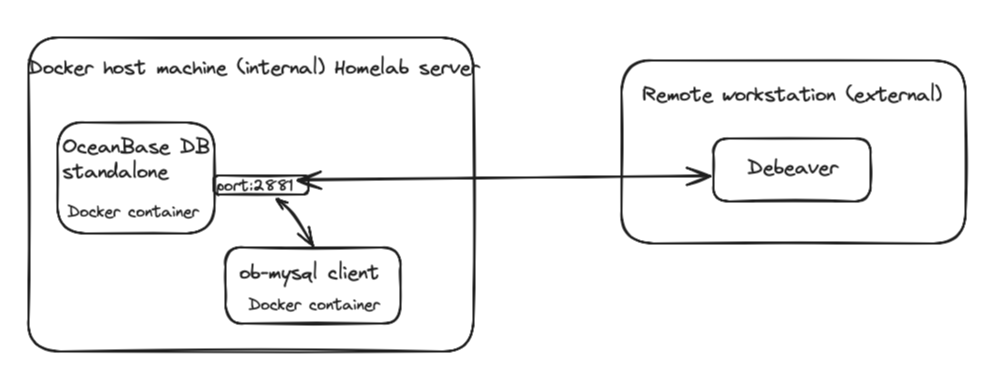
My setup is very simple as shown below.
Basic concepts
OceanBase DB documentations uses a lot of terms like OBServers, OBProxy, Zone and much more. These three components defines how an OceanBase cluster is physically organized. Let's start from the OBServer.
OBserver - The database node.
In OceanBase, each physical machine runs a single process called: observer. OBServer is not just storage. It is the entire database engine running on one node. An OBServer includes:
SQL engine (parser, optimizer, executor)
Transaction layer
Replication layer (Paxos)
Storage engine (MemTable + SSTables)
Log service (redo/WAL)
Resource management (multi-tenant isolation)
Note that, OceanBase is a shared-nothing architecture. That means:

- Every OBServer is fully independent.

- No shared storage.

- No special hardware.
Zone — A Logical Group of OBServers
A Zone is not a machine. It is a logical grouping of OBServers. A zone represents a set of nodes with similar availability characteristics. In practice, this usually means:
One datacenter
One availability zone
If you deploy OceanBase across 3 datacenters:
DC1 → Zone A
DC2 → Zone B
DC3 → Zone C
Each zone may contains multiple OBServers as follows:
Zone A
- OBServer 1
- OBServer 2
Zone B
- OBServer 3
- OBServer 4
Zone C
- OBServer 5
- OBServer 6
OBProxy — The Smart Router
OBProxy is separate from OBServer. It is the access layer of OceanBase. Each SQL queries goes through the OBProxy.
OBProxy:
Listens on MySQL protocol
Accepts client connections
Forwards SQL to correct OBServer
Automatically discovers cluster topology
When your application sends SQL:
OBProxy parses the statement.
Determines which Log Stream owns the data.
Finds the leader of that Log Stream.
Forwards the request directly to that OBServer.
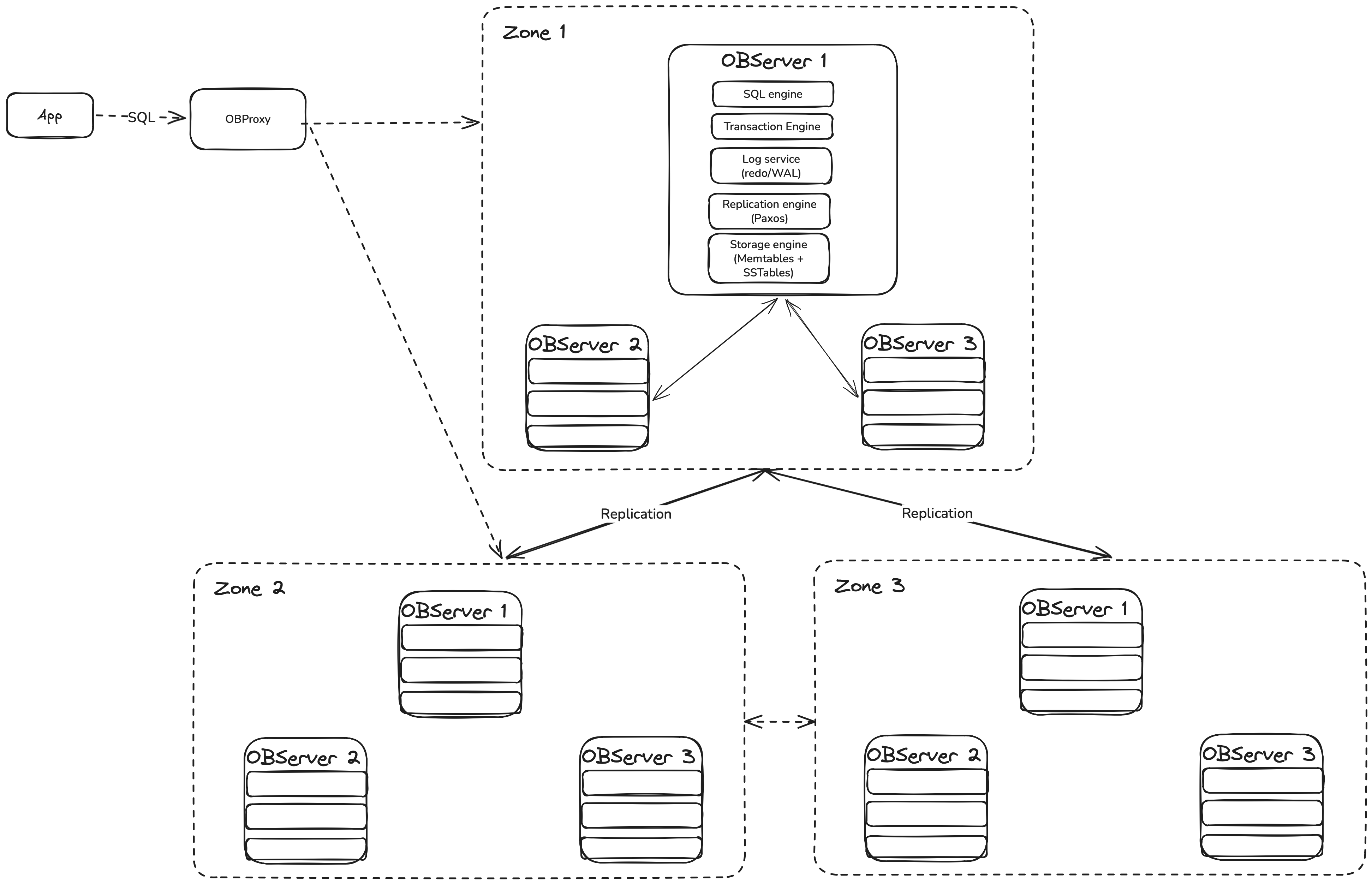
After reviewing the core concepts, let’s dive into OceanBase’s storage and replication layers. Understanding these components will clarify how the read and write paths operate—and how replication is implemented under the hood.
Replication level: Log Stream
In OceanBase, a Log Stream is the basic unit of replication, consensus, and failover. In simple terms: A Log Stream is a group of data that shares the same replication log and leader.
Think of it as a “data container” that moves and replicates together.Technically, A Log Stream is:
A collection of table partitions (called tablets)
With one shared write-ahead log
Replicated using Paxos
Having one leader and multiple followers
All data inside the same LS:
Is replicated together
Fails over together
Moves together during load balancing
You can think of every Log Stream as a small replicated database inside the cluster.
Each Log Stream:
Has one leader
Has multiple followers
Owns a group of partitions (called tablets)
Replicates data using Paxos consensus
Storage Level: WAL (Redo Log) and SStables (LSM Storage)
WAL (Redo Log) provides Durability + consensus of the data. On the other hand, SSTables gives the ability to Long-term data storage.
If you familiar with Cassandra Database, you probably knows how SSTables works.SSTables are part of its LSM-tree storage engine. It is an immutable, sorted data file stored on disk. LSM storage engines idea is very simple:
Writes go to memory first (Memtable).
Disk files are written sequentially and never updated in place.
Now we are ready to go through the process how write/read works in Oceanbase db.
What Happens When You Write Data?
Let’s say you run:
UPDATE accounts SET balance = balance - 100 WHERE id = 1;Here’s what happens step by step.
Step 1 — Request Routing
Your application connects through OBProxy.
OBProxy figures out which Log Stream owns this row and sends the request to the leader of that Log Stream. Only the leader can accept writes.
Step 2 — Redo Log Is Created
Before changing any data, OceanBase writes a redo log entry.
This redo entry contains:
Transaction ID
Changed data
Log sequence number
This is written to the Write-Ahead Log (WAL). If the server (OBServer) crashes after this point, the change can be recovered.
Step 3 — Replication to Other Datacenters
If OceanBase is deployed across 3 datacenters as shown earlier:
The leader sends the redo log entry to follower replicas.
Followers write it to their own WAL.
Followers send acknowledgment back.
The leader waits for a majority votes (2 out of 3).
Only after majority confirms:
The transaction is considered committed.
The client receives success.
Step 4 — Data Goes to Memory (MemTable)
After the redo log is safely replicated:
The change is applied to an in-memory structure called MemTable.
MemTable keeps rows sorted by primary key.
At this point:
The data is durable (because WAL is replicated).
The data is visible to future reads.
Step 5 — Flush to SSTable
When MemTable becomes large:
It is frozen.
Written to disk as an SSTable.
SSTables are immutable and sorted.
SSTables are built locally on each replica. The key point is that, they are not copied between servers. As a result, the write path looks like this:

What Happens When You Read Data?
Now let’s look at a simple read:
SELECT balance FROM accounts WHERE id = 1;Step 1 — Routing
For strong consistency, the request goes to the Log Stream leader. OceanBase supports snapshot reads using a global timestamp service (GTS). Each read gets a snapshot timestamp.
Step 2 — MVCC Snapshot
OceanBase uses multi-version concurrency control (MVCC). Each row version has a commit timestamp.
When reading:
The engine checks MemTable.
Then L0 SSTables.
Then L1 SSTables.
Then major SSTables.
It selects the newest row version that is less than or equal to the snapshot timestamp.
This provides consistent reads even during concurrent writes.
Here is the high-level view of the read path:

Understanding OceanBase under the hood isn’t about memorizing components or internal module names. It’s about understanding the data flow—how reads, writes, and replication actually move through the system.
Once that flow becomes clear, the architecture stops feeling complex. The pieces connect naturally, and the design decisions start to make sense.
From here, the next logical step is to explore distributed query execution in more depth.
In the next part of this series, I’ll deploy a three-node OceanBase cluster and run targeted tests to explore its behavior in a real environment.